Parallel AI Development: Lessons From a Few Thousand Dollars of Tokens
Three hot takes up front.
I enforce three rules on my team:
- No writing code by hand.
- No watching agents write code.
- No reviewing agent-written code in your editor.
The first time anyone hears one of these, they assume I'm joking. Why these three aren't nonsense is what the rest of this post is about.
Introduction
In 2026, AI coding has moved from "autocomplete assistant" to "autonomous builder." But the real productivity leap isn't one agent writing faster — it's the ability to start several agents in parallel, each pushing forward a different task.
It's worth noting that what can go parallel isn't limited to writing code. As agents get better at more things — research, data analysis, writing, testing, email, design — almost every kind of knowledge work that can be split into independent subtasks is a candidate for parallelization. This post focuses on development, the most mature case. If your work is something else, the ideas here should transfer.
Back to development. The question this post tries to answer: how do you run multiple AI agents in parallel without product quality collapsing?
To answer that, we first have to understand: what's blocking parallelism in the first place?
Three core bottlenecks
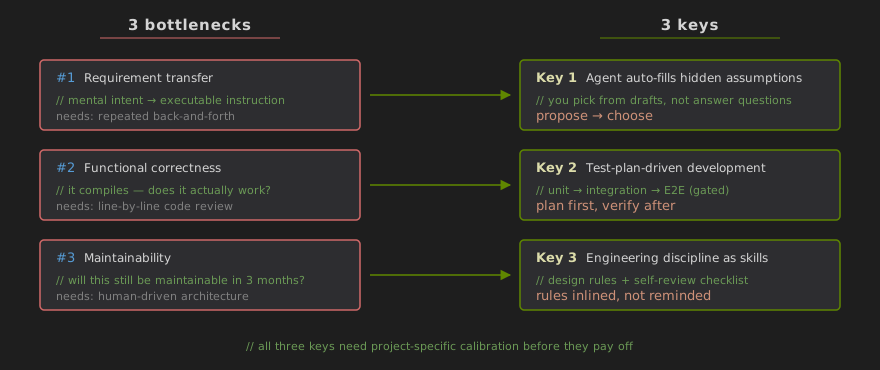
TL;DR: What actually limits AI-assisted dev throughput isn't generation speed — it's three stages that force a human to be deeply in the loop, turning the human into a single-point bottleneck that no amount of additional agents can route around.
Bottleneck 1: how do you transfer a requirement cleanly to the agent? What's in your head is vague, implicit, context-laden. What the agent needs is explicit and actionable. That gap usually gets closed through repeated back-and-forth.
Bottleneck 2: how do you make sure the code the agent produces is actually correct? Agent-generated code looks plausible but often breaks in practice. Historically we relied on humans reviewing every line, spotting problems, and feeding back — round after round.
Bottleneck 3: how do you keep the code maintainable? An agent's code may run today, but without sound architecture and engineering discipline, the codebase quickly decays into a mess — tangled modules, unclear ownership, changes that break three things elsewhere.
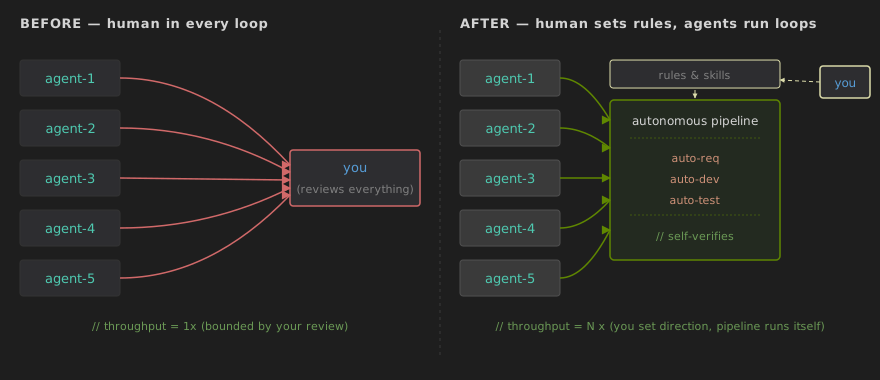
The three share one trait: they all require human-in-the-loop. And human attention is serial and finite. That's exactly why, in the past, starting five agents at once didn't give you five times the output — you still had to review their output one by one, talk through requirements one by one, steer architecture one by one. Parallel agents ultimately funneled into the same single-point human bottleneck.
Through 2025: human as driver, AI as copilot
TL;DR: Before Opus 4.5, the shared shape of every solution was "make human-AI collaboration more efficient," not "let AI close the loop itself" — human as driver, AI as Copilot. Parallelism was pointless: it just turned queueing into simultaneous queueing.
Before Opus 4.5, the field's response to all three bottlenecks shared one underlying shape: make human-AI collaboration more efficient — not make AI self-sufficient. That shape locked us in: the human was the driver, AI was the Copilot, and real parallelism was out of reach.
On requirement transfer, there were two mainstream paths. One was Spec-based — describe the requirement as formally as possible, then hand it to the agent. The other was multi-round conversation — argue with the agent until it actually understood. Both required the human's continuous participation.
On correctness, everyone relied on human code review. A person would read the agent's output line by line, find logic gaps or missed edges, feed back review comments, and iterate.
On maintainability, architecture design and code organization stayed human-driven. You had to tell the agent which module the code belonged in, what design pattern to use, what layering to follow — otherwise the agent would improvise, and the resulting code structure would be all over the place.
At this stage the real "autonomous driving" hadn't arrived. So the AI coding products of the time focused on optimizing the human-AI collaboration interface: tools that helped you discuss requirements more efficiently (early CodeBuddy, various Spec-based startups) or review code more conveniently (Cursor-style IDEs).
Parallel development made little sense in this era. You could open five agent windows, but all five were waiting on you — to review code, answer questions, confirm proposals. The bottleneck stayed on the human; parallelism only turned queueing into simultaneous queueing.
Late 2025: the turning point
TL;DR: In H2 2025 frontier models leveled up along four axes — autonomous debugging, instruction following, Skill-based discipline, and Computer Use. That shift lets mechanisms replace live human involvement in all three bottlenecks. Separately, failure got cheap — "try N approaches and pick the winner" became a default move.
In the second half of 2025, frontier models took a substantial collective step forward in code capability, instruction following, and long-horizon task completion. This generation of models — Opus 4.5 and its peers — made it possible, for the first time, to replace deep human involvement in the three bottlenecks with mechanisms. In other words, real parallel development finally had its prerequisites.
The shift showed up in four directions:
Autonomous debugging became much stronger. Give the agent a runnable debugging environment — a terminal, logs, a test framework — and it will locate and fix most everyday bugs on its own. Where before a human had to point out "there's an off-by-one error here," now the agent runs the tests, reads the stack trace, walks the call graph, and solves it.
"Understood correctly" more reliably translates to "implemented correctly." One key change: if the agent's understanding of the requirement is on target, and if you give it a test environment plus explicit acceptance criteria, then after its own test-and-fix cycle the code it produces is reliably correct in common business scenarios. Non-functional requirements (concurrency, performance, security) and architectural trade-offs are still exceptions — we'll come back to this.
Engineering discipline can be partially internalized through Skills. Hand the agent software engineering rules — naming conventions, layering, module boundaries, commit style — as structured Skill files, and it will follow most of them. Note "most": many design principles (deep modules vs. small composable ones, strategic vs. tactical design) are in inherent tension, and even senior engineers get them wrong regularly. Agents err on the same trade-offs. More on this below.
General Computer Use got much better. Agents aren't limited to reading and writing source files anymore. They interact fluently with terminals, browse documentation, drive GUIs to configure things — some people are essentially using them as advanced shells. One downstream consequence: a lot of "how to install" documentation is quietly shifting audiences — the target reader is now an agent. One markdown file, and the agent sets up the environment.
Stack all four together and you get one thing: the human can leave the hot path in a big way. Not disappear entirely — but go from "review every line" to "set rules, accept results, spot-check at pivotal moments." This is what opens the door to genuine parallel development.
An extra, quieter shift: failure got cheap
Beyond those four capability shifts, there's a strategic shift that deserves its own line: letting an agent try a solution costs far less than letting a human try one.
Before AI, you couldn't casually ask an engineer to "implement approach A first, then approach B" — people are too expensive. So the design phase had to resolve all the trade-offs up front; starting without a clear plan was a luxury. With agents, that constraint relaxes — "not sure which design? Then run a few agents in parallel, each trying one, and pick the winner after the tests come back."
This looks like a quantitative change but triggers a qualitative one: "multi-path exploration, pick the winner" goes from rare to routine. The principle runs through all of the parallel-execution modes below — a lot of the time you parallelize not because the task splits cleanly but because trying is cheaper than thinking it through. The "let multiple agents implement different versions and merge the best" idiom in Mode 2 below is a direct application of this.
Three keys to reducing human-in-the-loop
If the bottleneck is human involvement, the fix is to replace live intervention with mechanism. The next three subsections each correspond to one bottleneck and give a concrete approach — together they form the foundation of parallel development.
A realistic disclaimer: none of these three keys is "install and go" — each one needs to be broken in on your project together with the agent. What accumulates through that break-in isn't just one kind of artifact. Skill files are the most explicit one — they let you write down the pitfalls, project conventions, and error patterns the agent tends to fall into. But there's a second kind that only lives as intuition and feel in your head: what kinds of tasks the agent is reliable at, where it must be watched, when its confidence deserves to be discounted. That tacit sense is hard to put into a doc, but it plays a decisive role in how far you can actually let go. Before the break-in is done, you can't afford to be optimistic; after it's done, you can actually step back.
On the tooling side: I've distilled my own practice along these lines into a framework called zero-review, as a reference implementation. Each key below points to its corresponding skill for readers who want the details. But again — this post is about the ideas, not the framework; you can build the same thing on a completely different stack.
Key 1: requirement alignment — let the agent figure out what you want
TL;DR: Have the agent surface the hidden assumptions in your ask, rank the candidates using priors, and assemble them into a few complete draft proposals for you to pick. You go from "answering questions" to "reviewing proposals."
Unclear requirements are the most common reason for rework in AI-assisted development. You thought you explained it; the agent thought it understood; the result is nothing like what you had in mind. Two complementary approaches to this problem.
Approach 1: exhaustive questioning — force the agent to surface its blind spots
Concretely: write down what you want in your best natural-language attempt, then switch to Plan mode (or equivalently, tell the agent explicitly not to start coding) and give it a specific ask: "Before you do anything else, tell me — what parts of this requirement are still unclear to you? List the questions."
The agent comes back with a batch of questions. You answer them one by one, but don't let it start planning or coding yet — push again: "Based on my answers, is there anything new you're uncertain about? Keep asking." It's a requirements review — you're the PM, the agent is the developer who can't stop asking for details.
This runs 10–30 minutes depending on complexity. When the agent's questions start getting trivial or repetitive, the core ambiguities are covered. Now have it output a structured requirements doc, which becomes the basis for downstream work.
Approach 2: proposal generation + human selection — let the agent guess, you pick
Exhaustive questioning is thorough but slow, and fundamentally, you're the one producing information. A more efficient approach: let the agent fill in the blanks itself.
The pattern: same natural-language description, but this time you don't answer its questions — you give it a different instruction: "Analyze my requirement, identify the parts that are vague, undefined, or have multiple reasonable readings. For each such ambiguity, use your world knowledge (and feel free to search how similar products handle it) to give me your top three candidate resolutions with rationale."
Concretely: if you say "build a user-registration feature," the agent will identify a string of things you didn't mention but must be decided — email or phone? Email verification? Password complexity? Error messaging? Then it references mainstream practice ("most SaaS products use email + verification link") and proposes recommendations.
The crucial advantage: you become a proposal reviewer rather than a question answerer. Reviewing a proposal is much faster than answering a question — a glance, then "yes, go with your recommendation" or "swap the third for this." A large volume of requirement detail gets auto-filled by the agent from priors, leaving only the genuinely decision-requiring choices for you.
You can mix both approaches. For the core requirements where you already have a strong opinion, use Approach 1 and communicate thoroughly; for peripheral requirements where you don't care how it's implemented, use Approach 2. The output is a complete requirements doc that the agent can directly execute from — no more mid-development back-and-forth.
One special note: requirement alignment is the one step in the whole flow that cannot be truly parallelized — it consumes your deep attention. We'll come back to this in the scheduling section.
See
zero-review/auto-reqfor the concrete implementation.
Key 2: functional correctness — test-plan-driven development
TL;DR: Before any code is written, produce a test plan covering unit / integration / E2E. That plan must be reviewed by an independent party (another agent or you) to prevent one agent from contaminating both tests and implementation at once. Non-functional requirements get their own dedicated Skills.
If humans no longer review every line, who guarantees correctness? The answer is tests — but not ad-hoc tests. Before any code is written, produce a complete test plan.
The pattern: before the agent writes a line of business logic, have it produce a test plan from the requirements doc. The plan should cover three layers — unit tests verifying individual functions and modules; integration tests verifying that modules interact as expected; and end-to-end functional tests simulating real user paths to verify the whole feature runs through.
These test cases collectively represent "everything a correct implementation has to satisfy." They're fixed before development begins and become the agent's acceptance standard. After the agent finishes writing, it runs them itself. Any failing test triggers its own debug-and-fix loop until everything passes.
Under this pattern, you don't have to read every line of the agent's code. You only have to review the test plan itself — is it reasonable, does it cover the key scenarios? Reviewing a test plan is far cheaper cognitively than reviewing implementation code, because a test plan describes "what should happen" while code describes "how it's done." You, as the requirement's originator, naturally have judgment on the former; the latter requires deep code comprehension.
Prerequisite: the agent needs an environment it can actually operate
The agent running its own tests, debugging, doing end-to-end flows — all of it rests on a prerequisite people skip far too often: the agent needs an environment in which it can actually operate the system. Plenty of teams hand the agent a docker image with only source code and then wonder why it can't surface real issues.
"Operate" doesn't just mean "a working docker image." You have to expose the operation capabilities specific to the app type:
- CLI / APIs — shell + logs + test framework. Lowest bar.
- Web apps — beyond getting the service up, you must expose browser-use capability (a Playwright server, headless Chrome with a CDP port, or VNC). Without that layer, the agent can't click a button, can't observe a page's response, can't do a real end-to-end test.
- Desktop / GUI apps — must expose GUI-use capability (X11 forwarding, xdotool, a screenshot pipe). Otherwise the agent can only "imagine" what user interactions look like.
- Complex systems (state machines, async, concurrency, long-lived processes) — beyond logs, you must expose a debugger (gdb, DAP, Chrome DevTools protocol, or a language's built-in debugger). Let it set breakpoints, inspect variables, walk the stack — not fall back to scattering
printstatements and reading shell output.
A simple sanity check: imagine a new engineer who can only use the tools you've provided — could they reproduce a production bug? If they can't, the agent can't either.
The agent's capabilities have to match what you'd give a human engineer. This is the foundation TPDD rests on — if it's not in place, the test plan, the independent review, the persona role-play are all air.
Why the test plan needs an independent reviewer
There's an easily overlooked trap: if the same agent produces both the test plan and the implementation, any misunderstanding of the requirement contaminates both — tests and code go green together, both wrong, and you think everything's fine.
This is the biggest logical hole in TPDD. The fix: the test plan must be reviewed independently before entering the implementation phase.
"Independently" can be implemented in at least two ways:
- A human reviews it. Either you — the requirement's author — or a senior colleague, applying real business sense. Upside: domain common sense and business judgment. Downside: it consumes your deep attention and doesn't parallelize.
- Another agent reviews it. Spin up a fresh-session agent, give it only the requirements doc and the test plan (not the implementation context), and ask it to find holes. Fundamentally this is multi-agent cross-validation — one agent's misunderstanding is unlikely to exactly match another fresh-session agent's misunderstanding, so it catches a surprising fraction of interpretation-driven errors. The upside: cheap, parallelizable, doesn't get tired. The downside: its business perspective is second-hand.
The two aren't exclusive — mix them by project complexity:
- Low-complexity, low-risk projects (internal tools, prototypes, exploratory experiments) — one agent reviewer is enough; glance at its summary to make sure the direction is right.
- High-complexity, high-stakes projects (production critical paths, financial code, cross-team core modules) — have an agent filter the obvious holes first, then do a round of business-perspective review yourself. Pay special attention to three blind spots: (a) are the boundary conditions complete; (b) are error paths and exceptional branches covered; (c) do the tests really verify "what should happen" rather than "what did happen" (the self-fulfilling loop).
In other words, the review step can't be skipped, but the who-and-how-deep should scale with complexity. The key word is "independent" — the reviewer must not be the same session of the same agent that wrote the tests and the implementation. As long as that's enforced, contamination is mostly blocked.
See
zero-review/auto-devfor the concrete implementation.
What the functional test plan can't cover: write domain-specific Skills
The basic unit / integration / end-to-end test plan handles "functional correctness." But there are categories of requirements that aren't functional — a default test plan won't cover them:
- Non-functional requirements — concurrency, performance, memory leaks, security boundaries.
- Long-term evolution behavior — code that passes all tests today may fall apart after six months of ten overlapping changes.
The fix continues the same approach as Key 2: write these domain-specific testing practices as dedicated Skill files and have the agent run them itself. Examples:
- Stress-test Skill — teaches the agent how to construct high-concurrency load, observe p50/p99/p999, identify degradation curves, recognize SLA violations. It can stand up k6 / locust / wrk on its own, run a predefined load staircase, and produce a report with charts.
- Chaos-test Skill — defines which dependencies (databases, downstream services, network) get random fault injection; the agent simulates kills, delays, packet loss, etc., to verify graceful degradation and recovery.
- Security-test Skill — automated probes for common vulnerability classes (XSS, SQLi, privilege escalation, CSRF, ...). The agent acts like a junior pentester sweeping the common attack surface.
- Regression-evolution Skill — periodically runs an "architectural decay self-check" on key modules in CI: are files getting too big, is per-function complexity crossing a threshold, are inter-module dependencies forming cycles. This catches some of the "only-goes-wrong-after-long-evolution" signals early.
These Skills follow the same design philosophy as the base TestPlan: describe, in a structured way, what "done right" looks like in this domain; then hand execution to the agent. Writing the Skill is itself a chance to crystallize domain knowledge.
One class of decision remains that Skills can't cover:
- Architectural trade-offs — several structures may all be "correct" for the same requirement, but their costs and trade-offs differ. Tests can verify "does it run," but not "is this the right decomposition." This is fundamentally a business-context value judgment — only you (or a senior colleague) can spot-check it.
In other words, the "must be human-reviewed" set is smaller than it looks. Most of what feels "uncovered by tests" is really just a Skill you haven't written yet. What genuinely requires human eyes is architectural judgment — TPDD isn't about humans never reading code; it's about moving human attention from "read everything" to "read what actually requires business judgment."
Quick note: TDD vs. TPDD
Readers familiar with software engineering will notice the echo — this pattern descends from classic Test-Driven Development (TDD), but differs in a key way under AI collaboration.
TDD's canonical loop is "red–green–refactor": write one failing test (red), write minimum code to pass (green), refactor, repeat. TDD is fine-grained — each step focuses on a tiny behavior increment, assuming a human developer making incremental progress with immediate feedback.
Test-Plan-Driven Development (TPDD) instead produces the complete test plan for the whole requirement up front, then hands implementation and test execution to the agent in one shot. Coarser-grained but more automated. Its design intent isn't to guide humans step by step — it's to draw a correctness perimeter for the agent: you don't watch how it writes, you just need all the (human-reviewed) tests to go green to have high confidence it's correct.
Put differently: TDD is a programming discipline for human developers; TPDD is an acceptance contract humans set for AI agents. TDD's value is in driving design and keeping small-step rhythm; TPDD's value is in letting the human step back while the agent closes the full code-to-verify loop on its own.
(Note: TPDD is a label we're using here to contrast with TDD; it isn't established industry terminology.)
Going further: have AI role-play real users to find what code tests miss
Beyond code-based automated testing, another leverage point is the agent's Computer Use capability — let it operate the software interface as a "user." Driven by user stories in the requirements doc, it auto-generates realistic usage scenarios and walks them through via browser or GUI operation to verify how the software behaves under real interaction. This kind of testing is good at catching things automated tests have trouble with — broken layouts, awkward flows, unfriendly error messages.
A key technique when having the AI role-play users: give it different user types, each with its own blind spots and patience.
- Novice user — only recognizes what's visibly labeled on screen, can't parse technical jargon, gives up after two or three failed attempts; can't see the browser console or network errors, can only describe response time as "felt slow."
- Expert user — actively tries workarounds and alternate paths.
- Adversarial user — deliberately probes weird inputs, overlong fields, odd orderings.
The "can't see" part of each persona is the point — it forces the agent to report things through that persona's eyes. The novice-persona agent can only write "the page went blank for 5 seconds after I saved," not "initialization failed" — because it genuinely can't see the console. That constraint guarantees the feedback is what that type of user would actually report, not engineer-view feedback in disguise. Different personas surface completely different issues: novices expose jargon and broken main paths; experts expose missing shortcuts; adversarial users expose input-validation holes and exceptional-state crashes.
One more thing: real environment, not simulated — for a web app, actually spin up the container, actually run the service; don't cut corners with stubs.
See
zero-review/auto-testfor the concrete implementation.
Key 3: maintainability — constrain agent behavior with engineering discipline
TL;DR: Encode "what good code looks like" as Skill files so the agent checks itself against them during coding and self-review. The remaining architectural trade-offs are the ones you spot-check.
Correctness is guaranteed by tests. What guarantees maintainability? Rules.
Software design has a set of time-tested core principles (strongly influenced by John Ousterhout's A Philosophy of Software Design), all aimed at one thing: controlling the growth of complexity. In the AI development context, these principles can be encoded as Skill files and handed to the agent for use during coding and self-review. Here are the key ones.
Module depth. Good modules expose simple interfaces and hide substantial functionality. Agents naturally tend to over-decompose — carving classes very fine, ending up with a pile of shallow modules. Tell it plainly: don't split for splitting's sake; each module should hide enough complexity behind a clean API.
Information hiding. Modules shouldn't share each other's internal implementation knowledge. A common anti-pattern is splitting modules by execution order ("first do A, then B, so split into two") — this almost always leads to information leaks. The basis for splitting should be "who owns this knowledge," not execution order.
Abstraction layers. Each layer should provide a different mental model. If one layer just forwards calls verbatim to the next, that layer has no reason to exist. More importantly, complexity should flow downward — lower layers should take on more handling, leaving upper-level code clean.
Cohesion and separation. Code that only makes sense when read together should live together; when general logic and special-case logic get blended so that neither is comprehensible, they should be separated. Avoid producing code where "you have to read another function before this one makes sense."
Error handling. Proliferation of exceptions is a stealth killer of readability. Good design tries to "define errors out of existence" — adjust semantics or default behavior to reduce the places that need error handling, rather than sprinkling try-catch everywhere.
Obviousness and naming. Code should let readers guess correctly on first look. Names should be precise; the codebase should be consistent; nothing should violate reader expectations — a new engineer joining the project shouldn't be "surprised" when reading the code.
Documentation and comments. Comments should express what the code cannot — design intent, why this approach over that, the abstract semantics of an interface. Repeating what the code says is redundancy; skipping what code can't say is missing. Both are bad comments.
Strategic design. Every change is an investment in the overall design, not a tactical patch. Resist the temptation of "just make it work for now" — the time saved by shortcuts returns with geometric interest in future complexity. Also resist over-design — solve today's problem; don't build abstractions for imagined future needs.
An honest admission: these principles are in tension with each other
These eight aren't a mechanical checklist. They have internal friction:
- Deep modules say "deep functionality, simple interface"; small composable modules say "one module does one thing." They fight over "how big should a class be?"
- Strategic design says "invest a bit more now for the future"; warn against over-design says "don't build abstractions for imagined needs." The boundary has no objective answer.
- Information hiding says "don't leak internals"; too much hiding produces shallow modules (interfaces that don't reveal what they can do).
Even senior human engineers flip back and forth on these trade-offs — expecting an agent to get them right reliably from a single Skill file is beyond what today's evidence supports. Reality: agents get the common cases right most of the time; the remainder still needs you to spot-check, particularly on architectural decisions and long-term maintenance choices.
Which parts are most error-prone, and which principles matter most in your project — this is what gets distilled into the Skill files through break-in. A concrete example: if you notice the agent repeatedly over-decomposes a particular kind of scenario (say, always spawning five classes for one tiny feature), write that anti-pattern into the Skill — "for project X, in scenario Y, don't split into more than N classes." The Skill library grows with the project; it's an ongoing investment, not a one-off.
How it operates in three stages
With the requirements doc and test plan in hand, the agent first designs the code structure and architecture based on the principles above (module partition, interface definitions, abstraction layers, file organization); then executes implementation and testing; finally does a round of self-review against those same principles — checking for shallow modules, information leaks, pass-through layers, naming inconsistency, etc. — and fixes what it finds.
Your part: encode the design principles as Skill files loaded when the agent starts; spot-check architectural decisions in its self-review output. As break-in deepens, the number of spot-checks needed goes down.
See
zero-review/auto-devfor the concrete implementation.
Scheduling techniques for parallel development
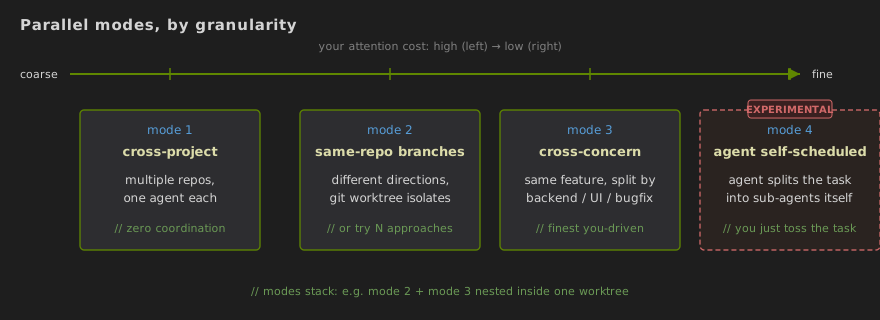
TL;DR: Three modes you can use reliably today, coarse to fine — cross-project / same-repo different directions (git worktree isolates) / cross-concern within a task — plus an experimental fourth where the agent splits the task itself. Modes aren't mutually exclusive; nest them.
The three keys deal with "can I let go of one agent?" This section deals with how to let go of several at once.
By parallelism granularity, there are three modes you can use reliably today (plus a fourth that's still in the experimental lane — discussed separately below).
Mode 1: cross-project — different repos, different agents
The coarsest, lowest-overhead form of parallelism. Several independent projects on your plate; one agent per project, each pushing its own work forward. Since the projects don't share code, the agents don't need to coordinate — you just do requirement alignment for each separately, then let them run.
There's almost no extra management cost for this mode. The only real thing to watch is how you allocate your own attention — rotate across the requirement-alignment phases of different projects rather than serially finishing one before starting the next. A useful rhythm: finish giving requirements to Agent A, let it generate the test plan; in that window, switch to Project B for its requirement alignment; by the time B's agent is working, come back and review A's test plan. You end up like a tech lead shuttling between meeting rooms.
Mode 2: same-project, different directions — git worktree isolates the parallelism
Different non-overlapping directions in the same project pushed forward at once, or several agents trying different approaches to the same requirement so you can pick the winner — the former is "doing separate things," the latter is the direct application of the "failure is cheap" shift above.
Technically, use git worktree for isolation. It lets you create multiple independent working directories from one repo, each checked out to a different branch — agents don't trip over each other, and when they're done you merge the branches back to main in priority order (agents can help resolve conflicts).
Key caveat: pick low-coupling directions for the parallel tasks. If two tasks heavily modify the same files, merge-conflict cost eats the parallelism gain. A rough rule: if the two tasks' primary-modified file sets overlap below 20%, go parallel; above 50%, go serial or re-slice task boundaries.
Mode 3: same work-item, different concerns — cross-concern parallelism
Inside a single feature, split by concern and parallelize. Even one feature's development contains multiple concerns of different kinds (backend logic tests, UI tests, known-bug fixes…), and they often parallelize naturally.
Concrete example. Suppose you're building an "order export" feature — you can start three agents at once: the first handles backend-logic testing (build a backend test plan covering edge cases like empty orders, huge volume, concurrent export, then author and run the test cases); the second handles UI-layer testing (Playwright end-to-end tests for the export button's interaction flow, file-download behavior, error-state display); the third works on a set of known bugs you previously observed.
The three differ in concern type (backend test, UI test, bug fix) and touch different code areas and tool chains — naturally parallel.
Mode 4 (experimental): within-task parallelism — the agent splits and schedules itself
This mode is in early exploration — behavior isn't stable yet. It's here so you know what's coming, not as today's recommendation.
Modes 1–3 put the scheduling granularity in your hands — you dispatch tasks, you slice them. Mode 4 hands that control to the agent: throw a task at the agent, and it figures out which sub-modules can be developed in parallel, splits itself into several sub-agents, and runs them concurrently.
You can already see the early form in agent products with team-style capabilities — for example Claude Code's team feature, where the agent splits a task into multiple sub-agents each owning one piece and working in parallel. You don't have to open worktrees or dispatch tasks by hand; you just toss the big task over. But the current limits are real: cross-sub-agent context sharing is still fragile, collisions happen when boundaries are fuzzy, and the merge stage still often needs a human.
That said, the prerequisite for this mode is worth building today: module boundaries and inter-module protocols have to be defined before coding starts. If sub-agents have to keep re-aligning "what format do you return / what do I accept" mid-implementation, they collide fast — merges end up worse than serial. So the precondition for this mode is exactly what Key 3 asks for: get your architecture right, fix interface contracts in advance, and each sub-agent works independently within its own contract, producing pieces that fit together. Projects that took architecture seriously will naturally benefit from agent-driven within-task parallelism; projects that cut architectural corners won't, even if the underlying platform gains team support.
zero-review/auto-dev currently requires "modularization + interface contracts" as a hard step in its architecture phase, specifically so that once this capability stabilizes, downstream within-task parallelism is immediately available.
In practice, the first three modes aren't mutually exclusive — you can nest Mode 3 inside a Mode 2 worktree, or use Mode 1 for cross-project coordination in a larger org. The finer the grain, the more attention-switching the human has to do, but the bigger the payoff.
The new bottleneck parallelism creates: you can't digest all the output
TL;DR: Not a future bottleneck — the moment you run 3+ agents in parallel, their output (code, test reports, feedback) piles up on you. The fix — having agents triage each other's output — is exactly the piece that isn't working reliably yet.
Imagine you're running a few parallel agents as described above, each producing code changes, test reports, user-test feedback, and retros. The first week you feel great about the pace. The second week you realize most of your day is spent reading everyone's reports — and plenty of those reports are duplicates or low-priority trivia piling up on you. You've moved from "reviewing code" to "reading reports." The bottleneck quietly returned to you.
The imagined fix follows the same pattern as bottleneck-breaking above: the output also needs to be digested by agents — batch-read all pending reports to find patterns and duplicates, merge different descriptions of the same issue, route by type into the next dev round, priority-rank by "users affected × has-workaround," attach a one-sentence rationale to each, and only escalate genuine high-priority items. Once this connects, the whole thing becomes a closed loop: you dispatch a requirement → agents develop in parallel → output gets auto-digested and organized → new work items get routed back into the agents.
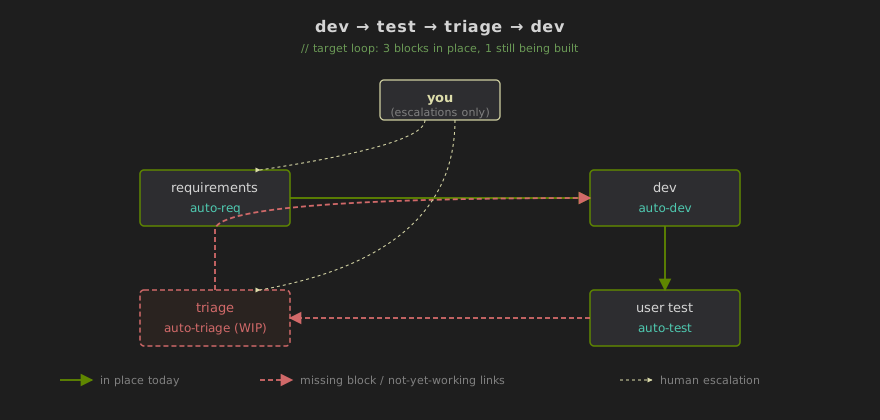
But this loop isn't closed today. I reserved a slot for it in zero-review (the auto-triage skill), but honestly it can't reliably replace human judgment yet — classification tends to drift, de-duplication tends to collapse genuinely distinct issues, priority without business context is shaky. This is the link in the loop I find flakiest today — and the one most worth continuing to invest in.
Until the loop closes, what you can do is build some transitional buffering: enforce a structured "summary + severity + suggested action" template on every agent's output so you can skim and triage in one pass; write the high-frequency low-priority issues into a Skill so the agent ignores them itself; block out a daily "read-output" time window instead of letting it fragment your whole day. But these are all buffers — the real fix is the fourth block of the loop getting built, and we're not there yet.
Operational advice
Start with two agents, grow from there. If you haven't done parallel development before, don't open five or six at once. Start managing two, get a feel for the rhythm, then scale up. Most people land on 3–4 agents as the comfortable ceiling for beginners — beyond that, context-switching and test-plan review themselves become a new bottleneck. Breaking through that ceiling isn't a willpower issue — it takes more mature task-decomposition technique: pre-slice a big task into pieces independent enough that agents' outputs don't interrupt you often, and shift your review granularity from "every output" to "every batch of outputs." That technique grows through break-in — once you're fluent, running 6–8 agents concurrently is feasible.
Requirement alignment can't be parallelized. A counter-intuitive but important point. Development execution parallelizes fine, but requirement alignment consumes your deep focus and really can't parallelize. The way to work it: do each task's requirement alignment serially (10–30 minutes each), then fire off development executions in parallel. Think of requirement alignment as "loading rounds" and execution as "firing" — loading needs focus, firing can happen in unison.
Treat the project Skill library as a living asset. If you're doing parallel dev frequently, invest the time to build a project-specific Skill file — engineering standards, architecture principles, test requirements, team preferences — and load it consistently for every agent. The earlier sections already covered how this library grows through break-in; the only point worth repeating here: for parallel agents' outputs to merge cleanly, the prerequisite is that they all consumed the same set of rules. Otherwise three agents write in three styles and the merged codebase looks like a patchwork quilt.
Scale your review granularity to project complexity. Low-complexity projects (internal tools, prototypes) — let it go; skim outputs and test plans. High-complexity projects (production critical paths, systems with security/performance requirements) — review test plans line by line, spot-check architecture decisions, read key modules' code. This isn't about "being lazy" or "being diligent" — it's about pointing limited attention at the places that genuinely require it.
But this won't make your life easier
TL;DR: Output goes up, but so does cognitive load per unit time — the math is favorable but not free. You have to deliberately leave yourself room.
After all the upside, an honest note: this path won't make you less tired. In fact, probably more. Output scales up, but so does the mental load — and almost without gaps.
Writing code has a rhythm — write a few lines, run, tweak, run — hand and brain trade off, and you can half-automate through a stuck moment. In the parallel-scheduling mode, your whole day is judgment calls: is this requirement draft right? Which design should we take? Whose priority is higher? What pattern emerges from this retro? One agent produces a direction decision every few minutes; five agents running in parallel stack five decisions on your plate. Total hours might not go up, but mental load per minute goes up sharply.
Put differently: you go from "physical plus mental" to "purely mental." The math is good — output goes up several-fold — but total cognitive load isn't smaller; it might be higher.
So make deliberate space for yourself: batch-process status reports so the agents' output doesn't chat-message your attention into fragments; block out undisturbed time for thinking about direction and process; don't let "letting go" become the illusion of "I don't have to do anything." What AI saves is work-you-were-doing-with-your-hands; the time saved doesn't turn into leisure on its own — you have to deliberately leave it blank.
You're no longer the one at the keyboard. You're the person designing and running the collaboration system. A higher leverage position, a bigger multiplier, and heavier demands on judgment. Tired, yes — but this is the kind of tired that actually creates value.
Summary
Parallel development isn't fundamentally about "starting more agents" — it's about "reducing the number of times each agent needs human intervention." Parallelism only gets meaningful once each agent can ship high-quality work under light supervision.
Three keys behind that: replace repeated negotiation with a structured requirement-alignment process (breaks bottleneck 1); replace line-by-line review with test-plan-driven development (breaks bottleneck 2); replace ad-hoc architectural oversight with Skill-injected engineering discipline (breaks bottleneck 3). Plus one strategic shift: failure got cheap — "multi-path exploration, merge the winner" became a default move.
Once you've broken in all three, your role shifts from "pair programmer to each agent" to "tech lead of a team of agents" — you set direction, set standards, review test plans, and spot-check at pivotal moments; the coding, testing, debugging, and most architectural detail are the agent's responsibility.
And this payoff isn't limited to development — any knowledge work that can be split into independent subtasks is a candidate. Coding is just the first case that's actually running.
If you want a more detailed version — I used AI to expand this blog post into a full book that covers each section in more depth, with more examples and operational checklists: Parallel Development Handbook (English).
Reference: previous post — How to Make VibeCoding Truly Useful